June 25, 2026
Introducing Repo Archiver for Bitbucket Cloud
Repo Archiver connects to your Bitbucket workspaces from Jira, classifies every repository as Active, Stale, or Archived, and lets you archive repos in one click — without leaving Atlassian.
Most Bitbucket workspaces have a graveyard problem. Projects end, prototypes get abandoned, forks get forked — and the repos stay. Nobody deletes them because nobody’s sure if anything still depends on them. Years later, you have 200 repositories and no idea which 40 are actually alive.
Repo Archiver for Bitbucket Cloud solves this in two steps: first, show you exactly which repos are stale; second, let you archive them properly — without deleting anything.
What it is
Repo Archiver is one product split across two Forge apps:
Repo Archiver for Jira is the Marketplace app. It connects to your Bitbucket account via OAuth and generates a report of every repository across all your workspaces, classified as Active, Stale (no commits or pull request activity in 90+ days), or Archived. You get a clear picture of your workspace health without leaving Jira.
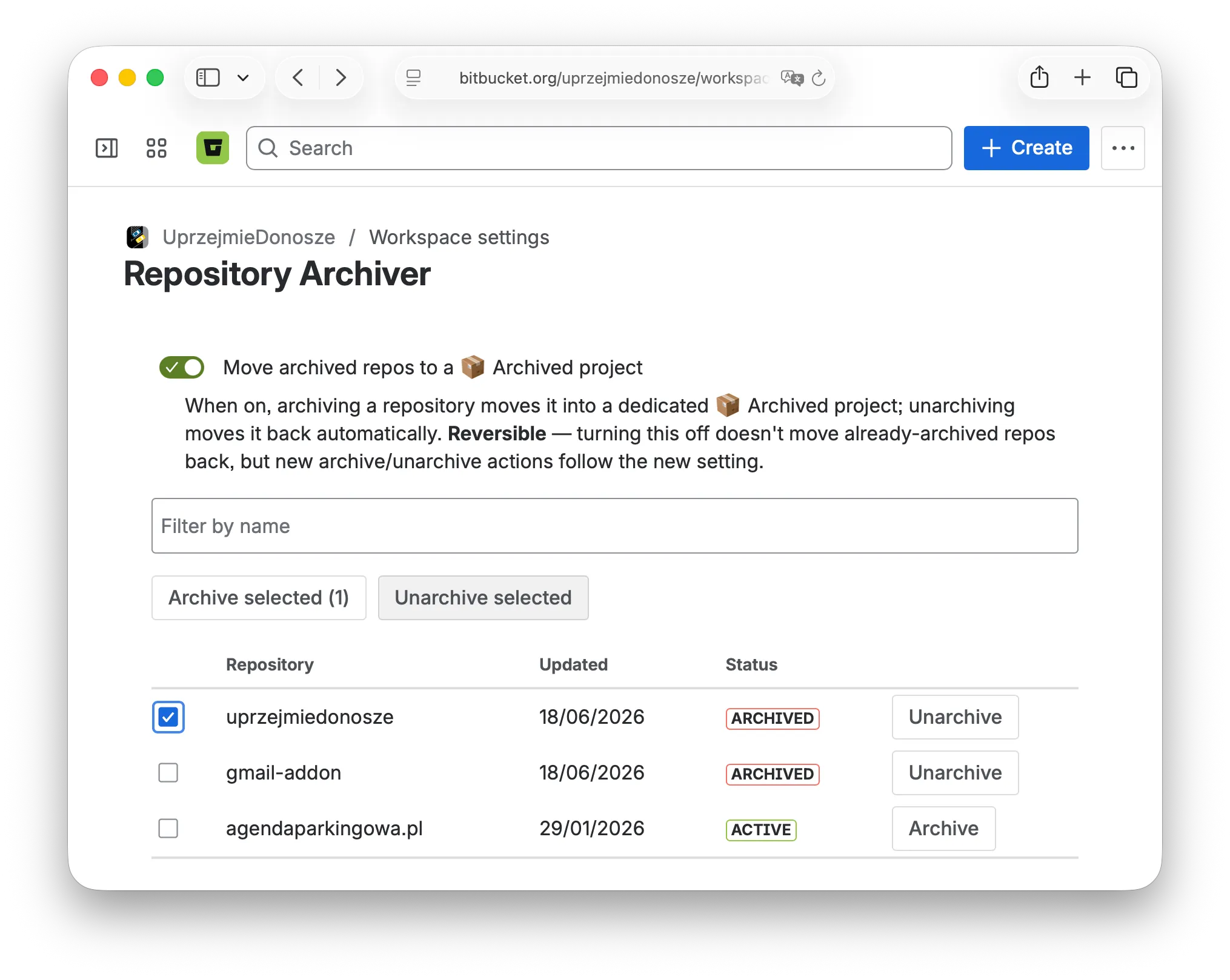
Bitbucket Repo Archiver is the companion app that does the actual archiving. It moves a repository into a dedicated ”📦 Archived” project, blocks new pull request merges into it, and shows a clear archived notice on the repo’s Source page — so anyone who lands there knows immediately that the repo is retired.
The two apps are independent but designed to work together. The Jira app tells you what to archive; the Bitbucket app does the archiving.
How to get started
1. Install Repo Archiver for Jira from the Atlassian Marketplace.
2. Connect to Bitbucket. In Jira, go to Apps → Repo Archiver for Jira and click Connect to Bitbucket. An OAuth consent popup asks for read access to your repositories and workspaces — approve it. This is a one-time step per user; no credentials are stored by the app.
3. Review your workspace health. The app lists every Bitbucket workspace your account belongs to. Expand a workspace to see all its repositories with their status labels.
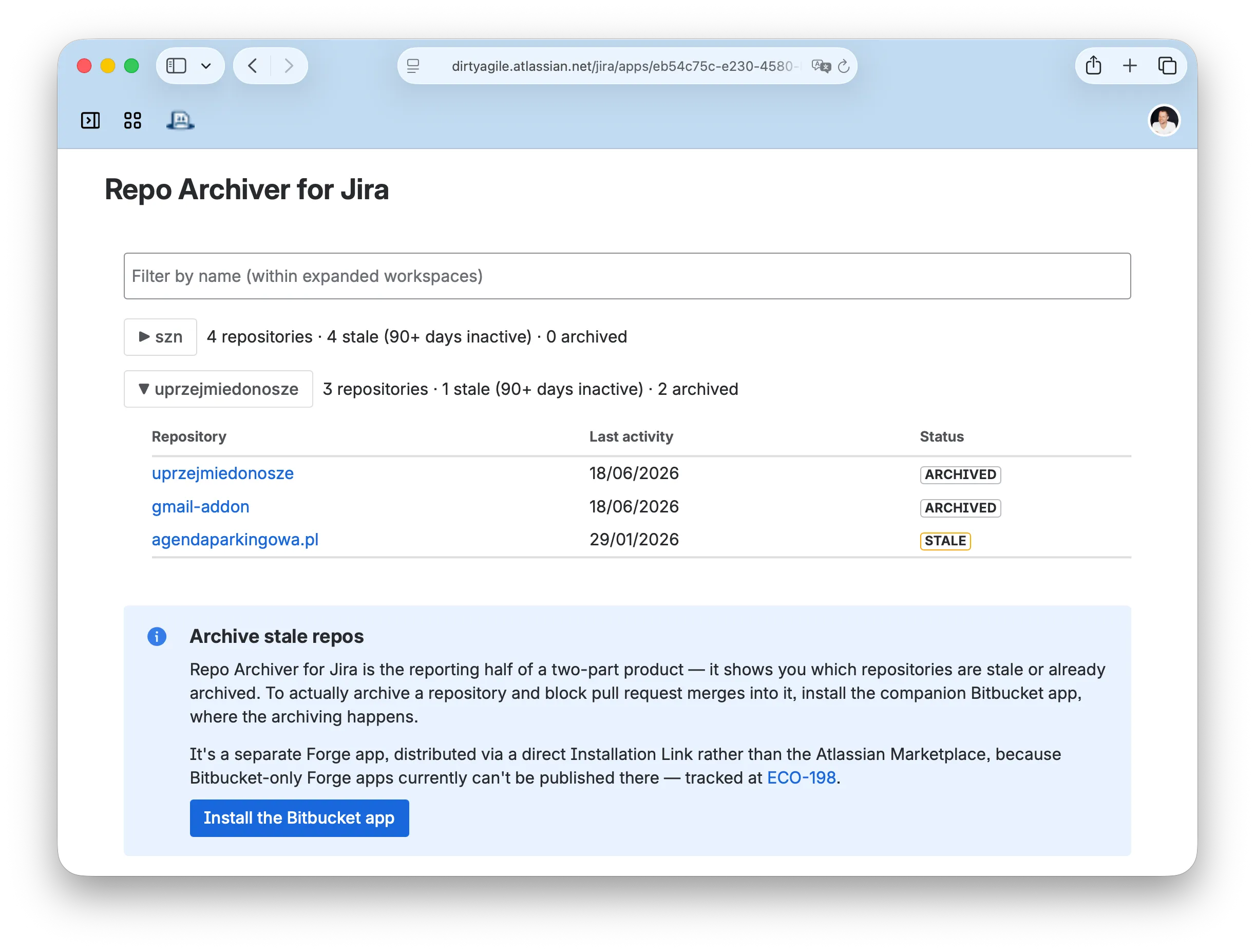
4. (Optional) Install the Bitbucket companion app to archive stale repositories. The installation link is surfaced directly inside the Jira app — click Install the Bitbucket app to open it. Once installed, you can archive repos individually from their repository settings, or bulk-archive from the workspace settings page.
What archiving does (and doesn’t do)
Archiving moves the repository into a ”📦 Archived” project in the same Bitbucket workspace. The code, history, and issues are all preserved — nothing is deleted. Pull request merges are blocked, which prevents accidental commits to a retired repo. The archived notice on the Source page makes the status obvious to anyone who navigates there.
To unarchive: toggle the switch off in the same settings page. The repository moves back to its original project.
A note on the two-app setup
Atlassian does not currently support publishing Bitbucket-only Forge apps to the Marketplace (ECO-198). That’s why the Bitbucket companion app is distributed via a direct installation link rather than having its own listing — and why the Jira app serves as the paid Marketplace product while the archiving functionality itself is free.
Who it’s for
Teams that use both Jira and Bitbucket Cloud and want to clean up workspace sprawl without a manual audit or the risk of deleting something important. The Jira app works independently if you only need the report — the Bitbucket app is optional but needed for actual archiving.